

Send an App Message
Inspire parishioners by sending messages through the Dashboard
We believe the Church has the best message to share and so we’ve made it easier and faster to communicate with your parishioners.
Now sign in to one location to upload your bulletin and send messages to your myParish app users to inspire Catholic life every day.
Six easy steps to create your first message.
Step 1 – Sign in
Sign in with your Diocesan.com username and password at the upper right hand corner.
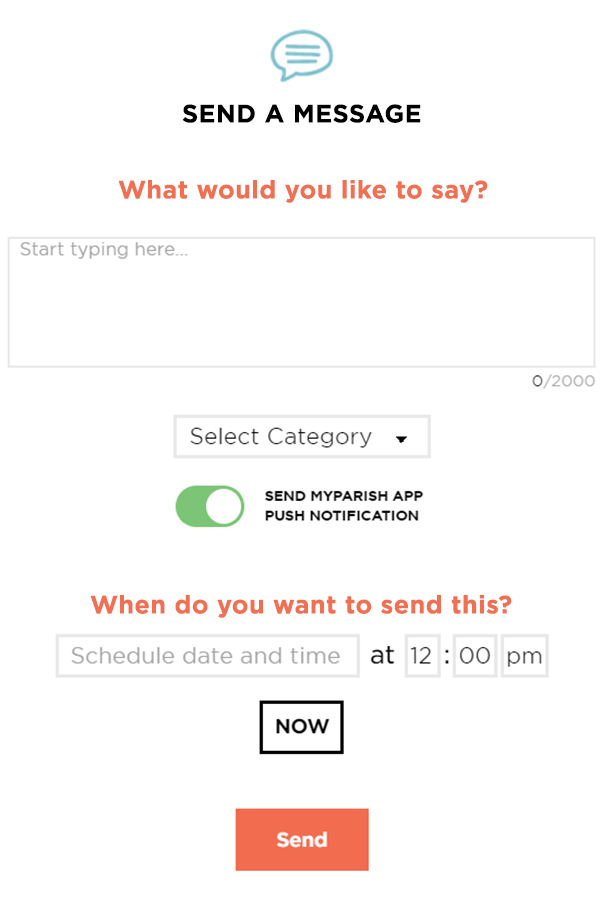
Step 2 – Know what you’re going to say? Then type away! Need some help? Check out our sample messages you can use.
Step 3 – Select A Category
Select the type of message you are going to be sending to you parishioners.
Step 4 – Push notification
This will send a notification straight to their phone
They will only see this message if they open the app
Step 5 – Choose when to send
You can choose to share your message now or schedule it for a later time.
Step 6 – Click Send!
All finished? Then go ahead and hit send and your message will be sent.
Have Questions? Give us a call
 1-800-994-9817